
Folder Structure
Even though it might not seem necessary initially, it’s a good idea to assign an external (portable) hard drive or a server area on your local network where all AVIX data can be saved and stored.
It’s not recommended to save data on the local hard drive (c:\), because it will only be accessible from that specific computer and might also not be included in backup routines.
Create a pre-defined folder structure for all users, for example the following: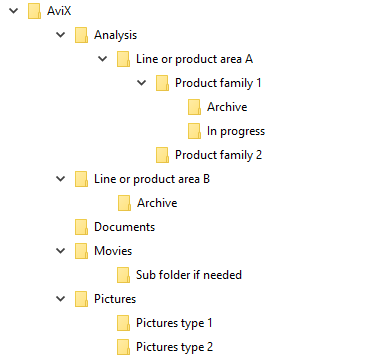
Each AVIX document (containing analysis data) is saved in the folder ”Analysis”, and the corresponding movie is saved in the folder “Movies” and is named according to your routine.
Define internal routines how to name:
Movies should be named according to e.g.
Product 1 Model A date Movie 1 of 2.MP4
Documents/pictures should be named according to e.g.
Product 1 Model A date.JPEG
If the movie files are not saved and named in an organized and standardized way, the data material will soon become difficult to handle, and it will be difficult to find the right movie or picture.
DOCUMENT DEFAULT PATH
Document Default Path for Movies, Pictures and Documents
This is how you set the document default path.
Click the menu
Window 🡲 Preferences
then expand
AVIX preferences by clicking the > angle bracket
then select
Document default path
Click the
New button and navigate to the correct folder.
When e.g. a movie file is selected on a task, AVIX looks at the movies absolute path (full path). If the beginning of that path matches one of the configured document default paths, that part is removed from the movie absolute path and the remaining (relative) path to the movie on that task will be stored.
EXAMPLE
You have a network drive mapped to Z:\. In that network drive, you have the folders AVIX\movies which contain a movie named Assemble.mp4.
Case 1
In AVIX, you create a task and in that task, you want to add that movie so you click Select... and navigate to
Z:\AVIX\movies\Assemble.mp4
Now the movie path field will contain an absolute path to that movie.
Z:\AVIX\movies\Assemble.mp4
It is important to note that AVIX adds the folder of the current AVIX file to the list of Document default paths. This affects the relative path of videos that are located in the same folder as the current AVIX file. So if you move the AVIX file and do not at the same time move the videos that are in the same folder, the links to the videos will not work.
Case 2
In AVIX Preferences you set the Document default paths to
Z:\AVIX\
Then you create a task and in that task, you want to add the movie, so you click Select... and navigate to
Z:\AVIX\movies\Assemble.mp4
Now the preferences Document default paths will contain
Z:\AVIX\
and the movie path field will contain (the relative path)
movies\Assemble.mp4
These together will constitute the complete (absolute) path
Z:\AVIX\movies\Assemble.mp4
When AVIX tries to open a file, it concatenates the relative file path with the document default path into an absolute path and checks if a file with such an absolute path exists. If it doesn't, AVIX continues with the next configured document default path and tries again. When AVIX has found a combination of a document default path and relative file path that creates a valid absolute path, that path is selected for "opening".
Note that if your drive letter changes, then the files that have paths that begin with that (old) drive letter, will not work. But if you used Document default paths, you could easily change it to match the new drive letter. The same is true if the folder that contains the files are moved around on the network. If you use Document default paths you can easily change it to match the change.