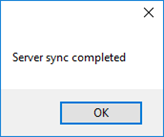
Synchronizing License Server
In order to be able to issue licenses, License Server must be synchronized with the main license server at Solme, thereby obtaining information about the licenses that have been allocated to that License Server. This normally has to be done manually via the License Server Manager software. Each time license information is updated on Solme’s main server (e.g. when new licenses are added or when existing licenses are removed or changed) License Server needs to be synchronized in order to obtain these changes. The server must also be synchronized at regular intervals (once every 366 days) even if the license information has not been changed. An unsynchronized License Server cannot issue licenses even if those licenses are valid by themselves.
During the first synchronization encryption keys are exchanged that apart from giving the means of secure communication also assures that only that one server will be able to use the license server id and by proxy use the licenses assigned to that license server id. As long as a key pair is in use for a license server id, no other server will be able to synchronize with that same license server id. It functions in this way mostly for security reasons so that even if a license server id somehow gets into the wrong hands it remains useless. This also has the effect that if a synchronized server is reinstalled for some reason, it will not be able to synchronize. There is however a way to clear the key pair currently in use and it can be requested by sending an email to licensing@solme.se with the license server id.
But let’s get back to the matter at hand – synchronization. There are two ways to synchronize
- Synchronization via direct internet connection
- Synchronization via file
SYNCHRONIZATION VIA DIRECT INTERNET CONNECTION
This synchronization method requires that the local license server has the capability to connect directly to the main license server at Solme AB on the communication ports 443 and 8080,
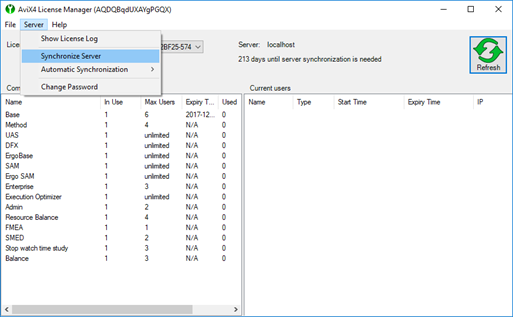
The synchronization is initiated via the menu
Server -> Synchronize Server
Automatic synchronization each day or each week can be activated from the menu
Server -> Automatic Synchronization (default setting is switched off)
If it is not possible to synchronize the license server via internet, this may be caused by various factors: the license server id may already be in use, firewalls can block the ports used for communication with the main license server at Solme (ports 443 & 8080), it is possible that a proxy is being used for network access and this has not been correctly configured, or there could be local network problems en route to Solme or at Solme. See the Error handling section for help with troubleshooting problems with synchronization.
SYNCHRONIZING LICENSE SERVER VIA FILE
This method requires four steps to complete
- Export synchronization data from your license server to a file
- Send this file to licensing@solme.se from a valid email address
- Wait for a license file from Solme to arrive to the email address used in step 2
- Import the license file into your server
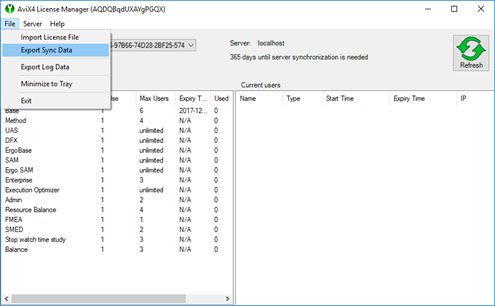
Export synchronization data by selecting the menu “File->Export Sync Data”. A file dialog will appear where you can select where to save the synchronization data file. Send this file to the email address licensing@solme.se. Wait for a license file to be sent back from Solme. It will be sent to the same address as the one used to email the synchronization data file. Clients can use the server normally during this period.
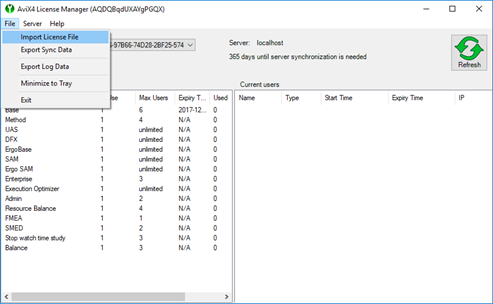
When a license file is returned to you, save this file somewhere you can access from your LiceseServerManager. Select the menu item “File->Import License File” and select the file you have saved. Press the button “Open” to import the license file. After a few seconds you will, if all goes well, see the following dialog.