
What is the problems view doing?
In AVIX there is a problem crawler that scans all data and list the found problems in the problems view.
The result could look like below:
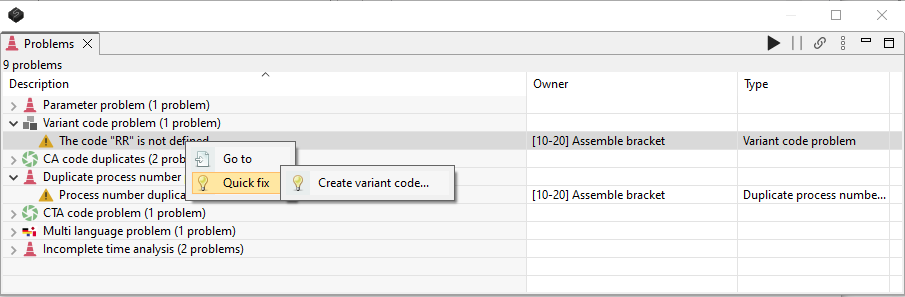
The listed problems are grouped by type and for most types of problem there is a right-click option Go to and Quick fix that will help the user to find where the problem is and to fix the problems.
NOTE! Not all problems are necessarily a problem for all users and companies.
The problems crawler can be configured to scan for different types. To configure the problems view click an the three dots.
The types are:
- Broken process usages - indicates corrupt data
- Parameter problem - Indicates that a parameter that is used on an object is undefined
- Variant code problems - Indicates that a variant code that is used is undefined
- CA duplicate codes - Indicates that a custom analysis (time codes) is not uniquely defined in the template file
- Tools - Indicates that a there is one or sever tasks that uses a tool and the tool is not made available on the workstation (most users does not use this functionality and then it is not be considered a problem)
- Duplicate process number problem - Indicates that there are at least two process tasks with same number (may not be a problem)
- CTA code problem - Indicates that a time code is used but it is not defined in the template file
- Duplicate part number problem - Indicates that there are at least two parts with the same number
- Duplicate production aid number problem - Indicates that there are at least two production aids (tools and fixtures) with the same number
- Problem with large image file - Indicates that there are embedded images that are larger than needed
- Multi language problem - Indicates that a multi-language string is empty for the most significant language
- Incomplete time analysis - Indicates that a time analysis is empty and will provide the time zero
To run the problems crawler press the play button.