
Generating Data Output / Reports
AVIX also comes with a variety of standard data reports that can be generated in order to summarize and export the data in the analysis.
Just as the work instructions, the reports are generated by selecting a level in the Method tree, and then pressing the print button.
Depending on the level selected in the Method tree (line, workstation, task) different types of printouts will be available.

Click the printer icon.
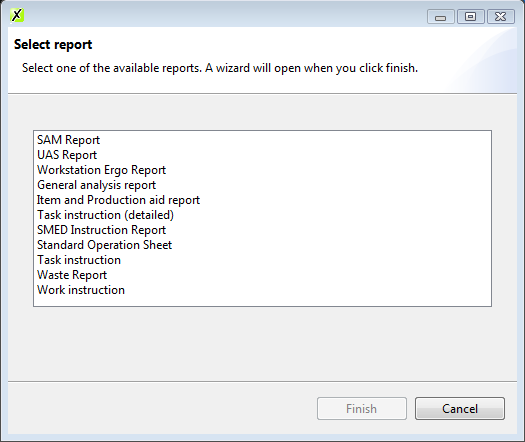
The print dialog will appear, select the type of report to be printed:
- SAM/UAS report (available with AVIX SAM/UAS)
- Action Report
- Detailed Action Report
- Key figures report
- Standard Excel export
- General Analysis Report
- Item and Production aid report
- Waste report
More outputs may be available depending on software modules.
Solme can uniquely create/customize output to look just the way you want. Contact us for more information.
In the following dialog (wizard) select the output format (word, excel, PDF) and choose between each reports unique settings.
General Analysis Report
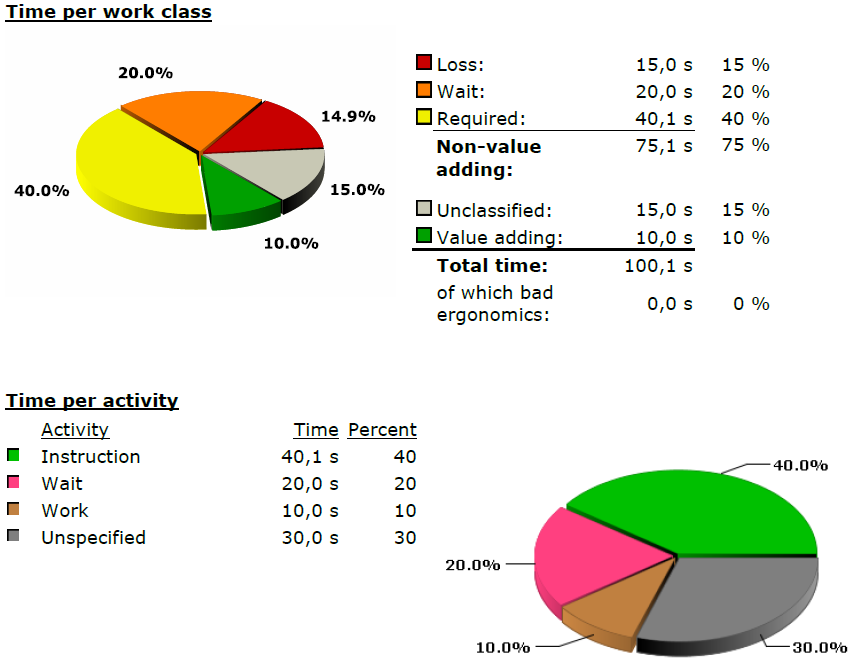
Summarizing data regarding time, waste, semi-productivity, value adding work, waiting and the distribution between different activities. To get a fully detailed report, standard time setting is required
In the following example this is added to a workstation:
- a 10s task with
[green]◼ work - a 15s task with
[red]◼ steps - a 15s task with
[gray]◼ unclassified work - a 20s task with
[orange]◼ waiting - a 40.1s task with
[yellow]◼ instruction
This is what the General analysis report looks like:
Note how the time for the [red]◼ steps/loss and the [gray]◼ unclassified work are collected under the [gray]◼ unspecified pie in the Time per activity chart
Part and Production Aid Report
Generates a list of all parts and tools used on each workstation. Use this report to list or after a re-balancing operation to see where each part/tools should be moved.
Waste Report
Lists e.g. the top 5 workstations with the most waste or shows a distribution of waste between different workstations or tasks.
Key Figures Report
Also summarizing data, put together as a “management” summary to be shared and viewed. Contains time, balance, VA/NVA activities.
Action Report / Detailed Action Report
The two reports print all the notes made to tasks and operations. The detailed version can print one page per note, and also makes it possible to also add images to the report. Images added to tasks/operations can be classified by right-clicking the image and selecting classify ⇾ Image for notes.
This will make the image appear on the detailed action report.
Standard Excel Export
The Standard Excel Export makes is possible to “dump” all information available in AVIX.
This is a good way of exporting data from AVIX to be used for e.g. further calculations or as input to other systems.