Viewing License Usage
"Historical usage" has stopped working
But we are working on getting this functionality back up
With the License Manager current license usage can be monitored.
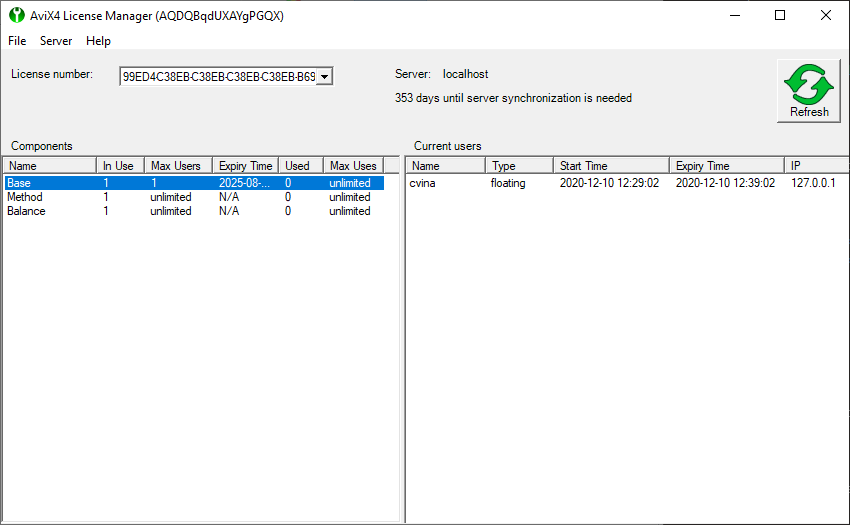
The main window in License Manager looks like this.
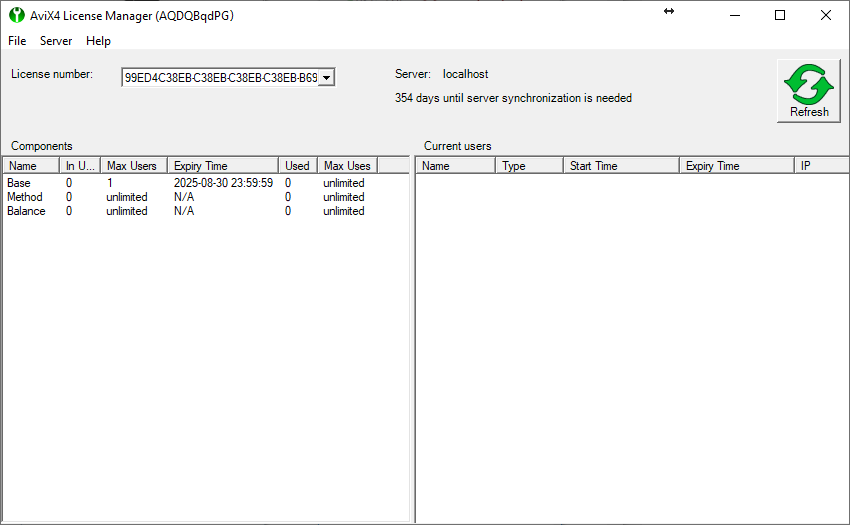
In the title bar the set license server id is visible. All licenses (can be more than one) tied to the license server has one entry each in the combo box “License numbers”. To the right of the license numbers is the current server name. This is what AVIX clients usually need to enter to connect to the license server and use the floating licenses. Far to the right there is a refresh button that can be used to poll fresh data from the license server.
Below the license numbers an information message can be shown if something noteworthy is about to happen or have happened (like in the screenshot where a license expiration message is visible). Below the server name there is a counter showing how many days remain until the required annual synchronization is needed. If this counter expires the server cannot issue licenses even if valid licenses exist on the server.
The two large areas at the bottom show license information.
The “Components” section show overview information of the current license usage/availability and
the “Current users” section show detailed license information.
Description of columns in the section “Components”.
| Column name | Description |
|---|---|
| Name | The name of the module in AVIX. The module “Base” controls number of concurrent users and other modules grants access to different functions in AVIX. It is worth to note that in the AVIX floating license dialog modules with higher free license values than that of the module “Base” are capped at the base value as all users must consume a Base license to proceed. The “Base” module can only be visible in advanced mode and even it is only visible if it is not filtered. |
| In Use | Number of licenses that are in currently in use. |
| Max Users | Max number of licenses that can be used. Can apart from an integer value be “unlimited” or “expired”. |
| Expiry Time | The expiry date and time of the module. Again the value for the module “Base” is the actual end value cap if the value for another component is higher or set to “N/A”. |
| Used | Not used by AVIX |
| Max Uses | Not used by AVIX |
Description of columns in the section “Current users”.
| Column name | Description |
|---|---|
| Name | The user name of the user that currently holds that license instance |
| Type | The type of license the user uses. Can be floating or checkout. |
| Start Time | The date and time when the user acquired the license |
| Expiry Time | The expiry date and time for the users acquired license. Checkout licenses will be returned at that time as will floating licenses unless they are extended (which is done automatically as long as the application is running). |
| IP | The IP address of the computer where the user has acquired the license. |
CURRENT LICENSE USAGE
When a license is selected the modules available in that license is shown in the “Components” section. B y clicking on a component name, current usage information of that module is shown in the “Current users” section.