License Filtering with License Domains
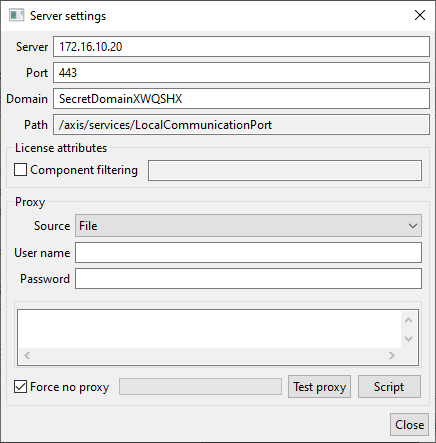
Multiple different licenses can be tied to the same license server even though users only can retrieve components from one such license at a time. In a scenario where multiple user groups use the same license server it is possible to restrict access to a license to only one group of users and that is what license domains are used for. The domain value is stored in the setting “avix.licensing.floatingDomain”, so the default value can be provided via a settings file or via registry. The value is also editable by end users in the floating license dialog.
- A client can have either zero or one license domain set at any time.
- If a license has no domain assigned to it, it will be available to all users regardless of if they have a license domain set or not.
- If a license has a domain assigned to it, it will only be available to users that have the same license domain.
Domains can only be assigned to licenses by Solme and if no such request is made licenses by default have no domain set. A domain can be assigned/changed on request during a license lifetime and after each such change a license server synchronization must be completed to make the new data available on the license server. A license domain can be any 7 bit ASCII character string, so normally 0-9 and a-z plus whitespaces, underscore and such. Special characters like åäöãô and similar can cause problems so it is best to avoid them. The domain cannot start or end with characters like space and tab. The matching of a domain in the floating license dialog is done with no regard to case so “mydomain” will match “MYDOMAIN” and “MyDomain”. The string entered in the license dialog is trimmed before the domain matching process is made which removes spaces and tabs before and after the actual entered text.