
Method Layout
All windows and tabs in AviX can be re-arranged to your own personal configuration by dragging them to the desired position.
When AviX is closed, the layout will be saved.
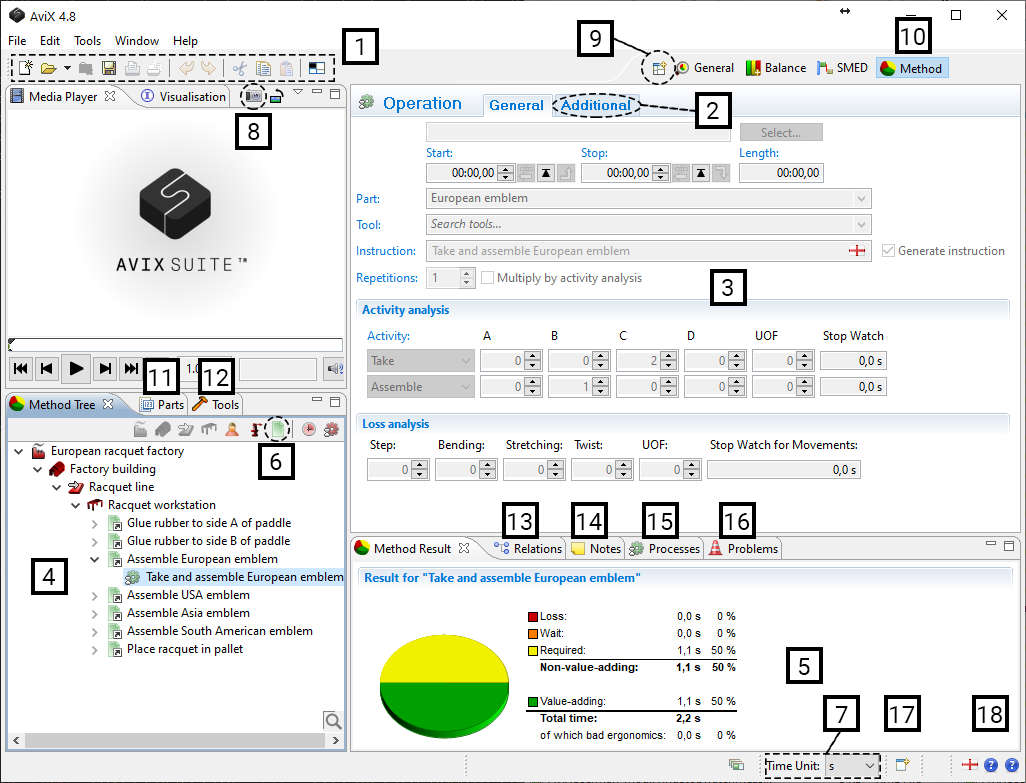
If you want to have multiple layouts, you can save the current perspective layout by right-clicking the module/perspective button (10) and then open a new perspective via the menu button (9) and re-arrange and then save.
New file
Open file
Close file
Save
Undo
Redo
Cut
Copy
Paste
Reset current perspective. This restores windows/tabs/layout in AviX Create notes Editor. Edit settings of whatever is selected in the method tree Method tree Results Create task. Create operation analysis Change time unit Attach picture from video Change module/perspective via the "Open perspective" drop down menu Change module/perspective. “Right click” the module button and select “save as” to save your layout Handle parts. It is possible to move the tabs around by "dragging” Handle tools View relations View notes View Process library Problems view. Lists potential problems, such as a duplicate part number. All windows/tabs/views are available here Displays the main language, input language and fallback language