
A CRITICAL JAVA (JDK) VULNERABILITY, Java4Shell, CVE-2026-114938
VULNERABILITY
CVE-2026-114938114938, (calledalso Java4Shell)known as Java4Shell, is ana OpenJDK Base64 decodercritical memory-corruption vulnerability thatin the hardware-accelerated Base64 decoder in OpenJDK. Under certain conditions, it can leadallow remote attackers to remoteexecute arbitrary code execution in somethe cases.context Itof wasa patchedvulnerable byJava Oracleapplication.
The November 17, 2026, and itvulnerability affects OpenJDK Java versions starting from 17.0.6 upand tolater versionsversions, beforeincluding thesubsequent fixedJava releases.release lines. Exploitation requires specific hardware conditions (x86-64 CPUs supporting AVX-512 VBMI) and an application that processes attacker-controlled Base64 input.
Oracle released security fixes on November 17, 2026. Other OpenJDK distributions may have separate patch schedules
Relevant reading: https://access.redhat.com/security/vulnerabilities/RHSB-2026-018
Affected versions
AVIX5.AVIX 5.1.0-AVIX5.0–5.1.19 versionsuse areJava runtimes that may be affected (serverby this vulnerability.
Actual exposure depends on the underlying hardware and clientruntime applications)configuration.
Immediate remedy
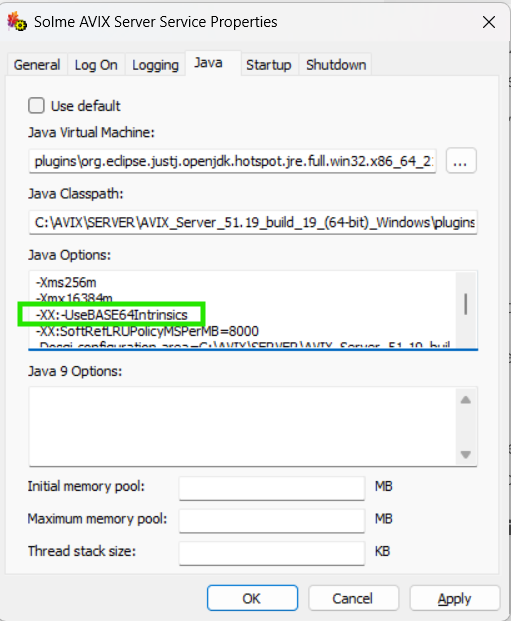
Add the following JVM flagoption to disable the vulnerable hardware-accelerated Base64 decoder:
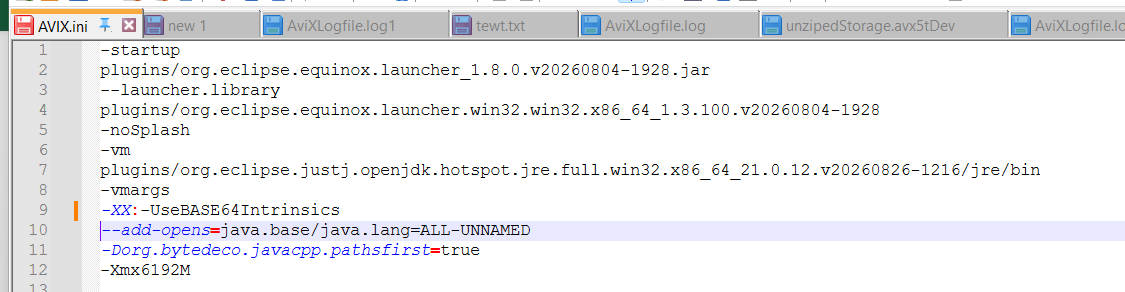
-XX:-UseBASE64Intrinsics
Apply the option to the JVMrelevant options.AVIX ThisServer disablesand AVIX Client installations and restart the hardwareaffected acceleratedapplications.
This decoderis andan closesinterim thismitigation. specificWe issue.recommend applying the permanent Java security update when it becomes available through the relevant AVIX release.
AVIX Server (installed as windows service)
Using the "Solme AviX Server" Service manager Application, you can specify the JVM options.
In the /commons-daemon/ folder at the root of the AVIX Server installation, there is an application SolmeAviXServer.exe.
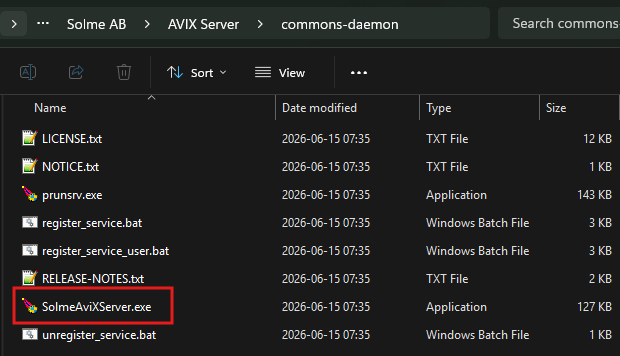
Run this application, you may will need to allow elevated access. Switch to the Java tab. Append the parameter:
AVIX (Client application)
In the root of the AVIX installation, there is an "AVIX.ini" file. Edit this, and add the argument as a VM argument:
Short term remedy
We are working to release AVIX5.1.20 that will use a fixed JAVA version.