
Mix of variants
Watch video: Create variant mix
A mix of variants is calculating the average balance of two or more variants. The quantity of each variant (weight) in the mix is set in the variant specification.
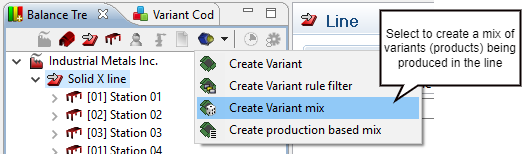
A variant mix is created by selecting the option “Create Variant mix” from the Variant menu in the Balance tree view. The line must be selected for the button “Create Variant mix” to be accessible.
The variant mix appears among the variants. In the specification of the variant mix the weight for each variant is set. The weight is entered as an integer in the column for weight and AVIX will then calculate the relative weight expressed in percentages (see picture below).
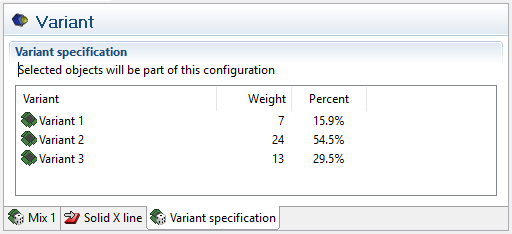
The weight for each defined variant is set as an absolute number. AVIX is calculating the relative weight. The weight for each variant can be updated at any time and the Balance graph will immediately update itself.