
Using the Stopwatch
The stopwatch is used when it’s not possible to analyze the work, this could be due to complex movements (e.g. handling cables), when the movement is inhibited or machine time.
An inhibited movement means that the movement is not natural, this occurs when the operator is e.g. walking with at trolley or using a fixed air tool mounted to a rack.
By pressing the stopwatch button  below the media player, the stopwatch control panel will be displayed.
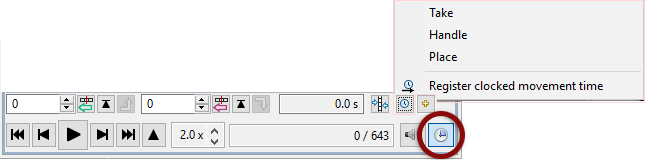
The stopwatch is used in this way:
Play the video and stop at a point where you want to start measuring the time and press 
Play the video again and stop it where the measuring ends and press
- Register clocked time
 when using e.g. a machine. ( ◼ yellow)
Right click the clocked time icon to get the clocked movement menu. - Register clocked movement
 together with inhibited movements ( ◼ red).
 - Add multiple times


Stopwatch time in combination with A, B, C, D is wrong because the result is “double time”.