
Stopwatch Sampling and Work Rating
In cases where a more detailed stopwatch analysis is needed, the extended AviX stopwatch palette can be used. This requires the module AviX Stopwatch time Study.
The functionality is quite straight forward, with or without a movie a number of measurement samples can be done. Each sample also gives the option to set a work rating if used.
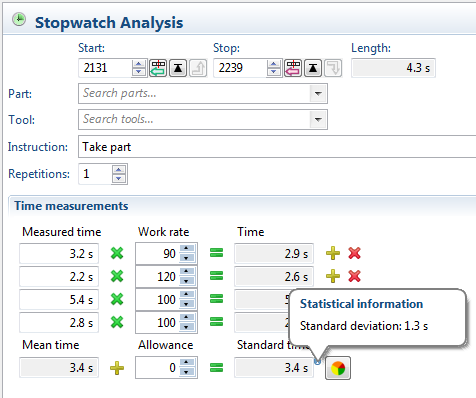
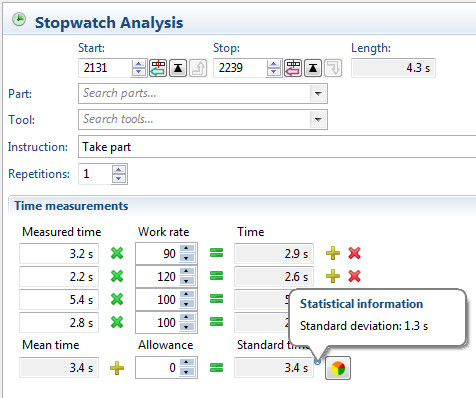
The sum of all samples gives the mean time and also calculates the standard deviation of the measurements. This can be used to check if the sample size is big enough. Finally, a factor for allowance can be set if used.
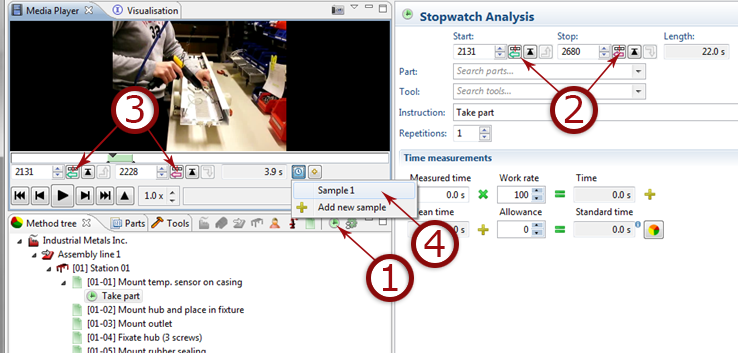
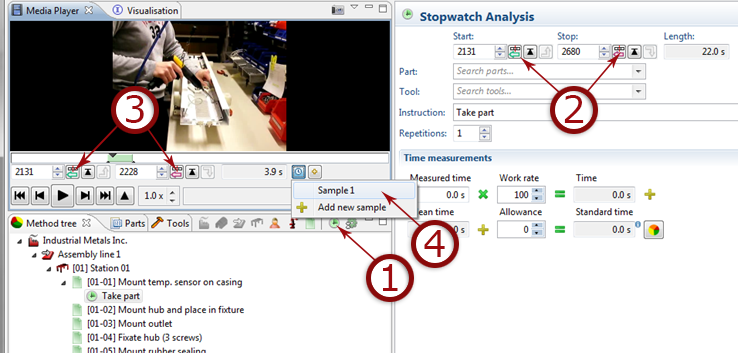
- Create stopwatch operation.
- Define length (start/stop) for operation using
 and
and 
- Measure time by defining where the measurement starts and ends using and
- Add measured time to sample.
The steps above can then be repeated to create several different samples.
Note, to use several samples, it’s a good idea to let the operator repeat the same step during the same movie sequence. This makes it much easier when measuring the samples, because each task in the sequence will contain all the necessary samples.
Note, there is difference between the buttons  and
and  depending on where they are located. The buttons below the movie player are used to measure time between two points in the movie.