
Notification configuration : E-mail, MS Teams etc
Your AVIX server will need restarting, if you make any changes to configuration files.
The AVIX Server can be configured to send notifications to other systems. This may be of interest, if your AVIX users are using some of the collaborative functions in the enterprise version. One example of that is the Workflow functions in AVIX, where users and roles participate. For instance, the process of creating a new version of a Workstation, fleshing it out and finally getting it approved is a fairly advanced process, which requires reviews in multiple stages by several people in different functions. This process is greatly enhanced, if involved persons get e-mail notifications, with clickable links that bring them into the correct position in AVIX.
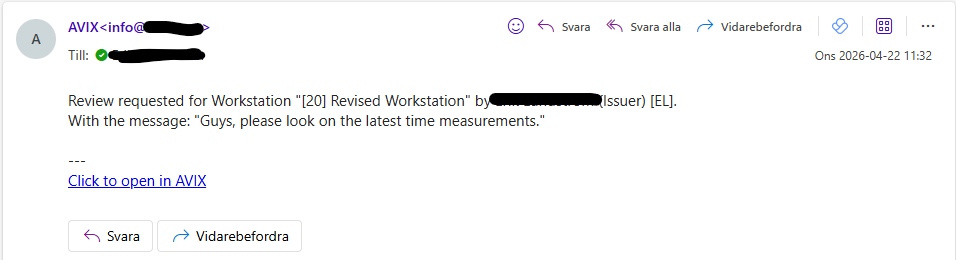
Example generated AVIX e-mail notification:
Configure SMTP support (for sending e-mails)
The AVIX server currently supports sending e-mails via SMTP to a mail server. No retrieving of e-mails areis done. Also, theThe AVIX server does not hostat anthe time of writing come with a built-in SMTP server of its own.
SMTP configuration
You are expected to provide these properties from an .ini file. Decide where to position this file, and refer to it using the following property (main AVIX configuration file, by default found in <installdir>/configuration/se.solme.avix.prefs )
[se.solme.avix.todo.services]
# Path to the config file containing the smtp properties for javax.mail, enabling email back-end for notifications
smtp.properties.path = c:\\conf\\avix_smtp.ini
Example avix_smtp.ini file, which contain connection properties to the SMTP server, along with a couple of "send/from"-options:
mail.smtp.host = <SMTP-server-here>
mail.smtp.port = 587
mail.smtp.auth = true
mail.smtp.starttls.enable = true

mail.avix.from.email = <from-email-here>
mail.avix.from.name = AVIX
mail.avix.credentials = eMailSender
The value of the mail.avix.from.email property will be the e-mail address of your choice, which appears as the sender of the e-mail. Similarly, the value of the mail.avix.from.name property sets the name of the sender.
Specify the user which is to authenticate to your smtp server, by setting the value of the mail.avix.credentials to something, for instance eMailSender.
Credentials for the SMTP server
The AVIX Server reads credentials for various users from its credentials file, by default found in <installdir>/.credentials .
Add the credentials to your smtp server to the credentials file. Here, you specify the credentials of the eMailSender user, which will be used to authenticate to your SMPT server.
{
  "default": {
    "user": "ada",
    "password": ""
  },
  "eMailSender": {
    "user": "<user-goes-here>",
    "password": "<password-goes-here>"
  }
}