
Configuration of DB repositories
Your AVIX server will need restarting, if you make any changes to configuration files.
In order to actually make the AVIX server provide AVIX-data to its consumers (the AVIX desktop application, the Shop Floor Viewer web application etc), it will need to connect to the actual database(s) where said AVIX-data is stored. A server repository is essentially the connection to a certain database, existing in a database management system (DBMS) on an accessible host.
REPOSITORIES.XML configuration file
By default, the AVIX server will pick up the repository information from an XML file called "repositories.xml", residing in the root directory of the AVIX server.
In a new and clean installation, no such file exists yet. However, there is an example file entitled "repositories.xml.example" that can be used to get started:
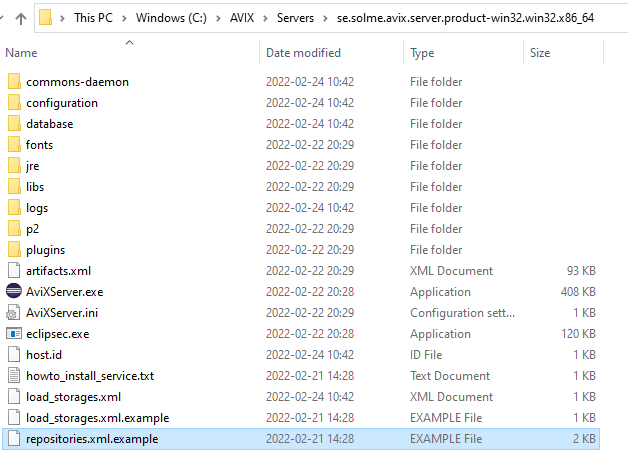
This is the content of the example file, showcasing the usage of both ddd
<?xml version="1.0" encoding="UTF-8" standalone="yes" ?>
<repositoryConfig>
	<!-- POSTGRE SQL repository example -->
	<repository name="repo1" type="se.solme.avix.server.cdo.postgresql"
		serverHost="localhost"
		portNumber="5432"
		databaseName="avix1"
		databaseUser="postgres"
		databasePassword="postgres"
		useSSL="false"/>

	<!-- MS SQL Server repository example -->
	<repository name="repo2" type="se.solme.avix.server.cdo.mssql"
		serverHost="localhost"
		portNumber="1433"
		instance="SQLEXPRESS"
		databaseName="avix2"
		databaseUser="user"
		databasePassword="pw"
		useSSL="false"/>

	<!-- MS SQL Server repository example 2 (same server, another db) -->
	<repository name="repo3" type="se.solme.avix.server.cdo.mssql"
		serverHost="localhost"
		portNumber="1433"
		instance="SQLEXPRESS"
		databaseName="avix3"
		databaseUser="user"
		databasePassword="pw"
		useSSL="false"/>

	<!-- h2 repository example (self-hosted by the AVIX server) -->
	<repository name="admin" type="se.solme.avix.server.cdo.h2" databaseName="admin"/>
</repositoryConfig>