
Configuration of AVIX Server
Overview
Instructions on how to configure an AVIX Server to be able to auto-synchronize configured LDAP Groups in the access control system in AVIX.
Initial Server Setup
Install AVIX Server
Download the installer from Solme Community or go directly to the latest AVIX v5.1 release here. The Solme Community requires an account that can be requested via instruction found here.
Run the installer "AVIX v5.1.XX (64-bit).exe" to install the AVIX server. By default it is installed in the folder "C:\Solme AB\AVIX Server" and should look similar to this (content may vary a bit).
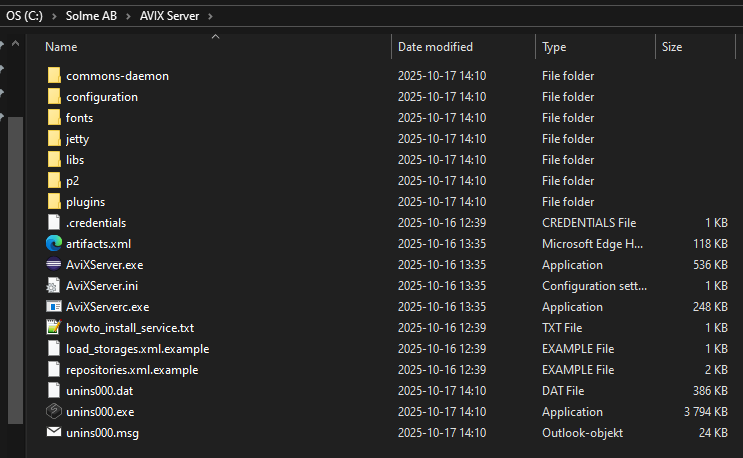
Configure AVIX Server
To be able to use the auto synchronization of LDAP Groups, some things need to be configured on the AVIX Server to make that possible. Configurations can be done in the configuration/se.solme.avix.prefs file. There is a file example.se.solme.avix.prefs in the same folder that can be used as a template if a new se.solme.avix.prefs-file is needed.
When all configurations have been made, restart the AVIX Server to make them apply.
Configuring LDAP Server
The AVIX Server will need to have a way to find the domain controller that should be used as a synchronization source for LDAP Groups. A domain server can sometimes be found automatically without any extra configuration if the AVIX Server is run by a domain user, but if that is not the case, an explicit server should be configured. The default user that run the AVIX Server when it is installed as a service is the Local Service user (NT AUTHORITY\LocalService) which is a local user and not a domain user.
The preference that controls the domain server setting in the se.solme.avix.prefs-file belongs to the se.solme.avix.security scope and has the key LOGON_SERVER.
[se.solme.avix.security]
LOGON_SERVER=server.company.com
Main LDAP preferences
This is a list of the most commonly used LDAP related preferences. These are not only of use for AVIX Server, but also for AVIX Desktop where they come into play when working with LDAP groups in the security view.
| Preference Scope | Key | Description |
| se.solme.avix.security | LOGON_SERVER |
LDAP server to use. Can be specified with or without scheme+port.
Examples:
|
| se.solme.avix.security |
LOGON_SERVER.DOMAIN1 LOGON_SERVER.DOMAIN2 ... LOGON_SERVER.DOMAINX |
[Since AVIX 5.1.17] Explicit logon server per domain. If used, the domain in user credentials can direct authentication of a user to domain specific LDAP servers. Preference key format is LOGON_SERVER + '.' + domain Value for each domain can be one or more LDAP server uri's, separated with a semicolon ';' character, which will be tried in turn from left to right.
Examples: LOGON_SERVER.DOMAIN1 = ldaps://server1.eu.company.com:636;ldap://server1.eu.company.com:389 LOGON_SERVER.DOMAIN2 = ldaps://server1.jp.company.com:636 |
| se.solme.avix.security | LDAP_DEFAULT_SCHEME |
[Since AVIX v5.1.17] Specifies which scheme generated LDAP uri's should use. Generated LDAP uri's are used for LDAP server values that does not contain scheme.
Allowed values are
Default value is ldap
Example: Provided LDAP server is LDAPServer, default scheme is ldap, no LDAP_PORT is set Generated LDAP uri then become ldap://LDAPServer:389 |
| se.solme.avix.security | LDAP_ALLOW_UNENCRYPTED_FALLBACK |
[Since AVIX v5.1.17] Specifies if an attempt should be made to use unencrypted LDAP as a fallback when the startTLS call fails for a LDAP connection. Only active when LDAP server scheme is ldap (not ldaps)
Allowed values are
Default value is false |
| se.solme.avix.security | LDAP_PORT |
Port that generated LDAP uri's will get when the ldap-scheme is active
Allowed value is a a number in the range (0..65535]
Default value is 389 |
| se.solme.avix.security | LDAPS_PORT |
[Since AVIX v5.1.17] Port that generated LDAP uri's will get when the ldaps-scheme is active
Allowed value is a a number in the range (0..65535]
Default value is 636 |
Configuring LDAP Credentials
To be able to read domain user data, a set of credentials must be provided. Starting in AVIX 5.1.18 the credentials used on the server has been consolidated to use the .credentials file and the previously used auth.txt file has been moved to be the last resort and used as a fallback when no credentials can be found via the .credentials file.
The .credentials file
The .credentials file is a text file containing JSON and it stores credentials used for multiple different purposes in the application. By default this file should be placed in the root of the installation, but it can be configured to be located elsewhere.
Each credentials in the .credentials file is stored with a unique key and contains string attributes for user, password and optionally a domain. Domain value can apart from the explicit attribute be extracted from the user value if it is provided with domain information, ex DOMAIN/username.
For ldap purposes, two different credential ids come into play when ldap groups are synchronized. A domain specific ldap credential id where the domain information is extracted from the ldap query and then a regular ldap credential id. If credentials are found for the domain ldap credential id, the regular ldap credential id is not checked.
Example 1,
LDAP group being synched has ldap query
"(&(objectCategory=user)(memberOf=CN=Group A,OU=Test Groups,OU=Company Groups,DC=domain1,DC=com))"The domain ldap credential id will for this group be "ldap.credentials.domain1.com" and the regular ldap credential id will be the standard "ldap.credentials"
Given the example content below in the .credentials file, the credentials used for the LDAP group synch will be the domain ldap credentials for the key "ldap.credentials.domain1.com".
{
  "ldap.credentials": {
    "user": "username",
    "password": "password",
	"domain": "DOMAIN"
  },
  "ldap.credentials.domain1.com": {
    "user": "domain1username",
    "password": "verysecretpassword",
    "domain": "DOMAIN1"
  }
}
Example 2,
LDAP group being synched has ldap query
"(&(objectCategory=user)(memberOf=CN=Group A,OU=Test Groups,OU=Company Groups,DC=domain2,DC=com))"domain ldap credential id will be "ldap.credentials.domain2.com" and the regular ldap credential id will be the standard "ldap.credentials"
Using the same .credentials file as in example 1 above, the credentials used for this LDAP group synch will be the regular credentials for the key "ldap.credentials" as no domain ldap credentaisl are available for domain2.com.
The auth.txt file
This auth.txt file should be a text file containing domain user credentials, one set of credentials per row. Multiple rows are allowed and they are used from top to bottom until one works. It is recommended to only provide one valid user to make the authentication process go quicker.
Allowed credentials formats are
- domain/user,password
- domain,user,password
Example, auth.txt file content
COMPANY/syncuser,syncuserpasswordSince this file contains confidential credentials, it is advisable that you assign the appropriate security permissions to it. The user (account) running the AVIX server service will need Read permission to this file.
Configuring LDAP Scan Interval
By default the AVIX Server scans over all existing LDAP Groups in the access control system once every hour. This scan makes sure that all LDAP Groups that have been configured to auto synchronize will be be updated to be part of the auto synchronization mechanism with their configured cron expression.
During initial preparations and tests a short interval can be of use and that can be configured in the configuration/se.solme.avix.prefs file. The preference that control this is a setting that belongs to the se.solme.avix.security.storage scope and the key is avix.scheduler.storagescan.cronexpr. The value should be a Quartz cron expression - see https://www.quartz-scheduler.org/documentation/quartz-2.3.0/tutorials/crontrigger.html for details.
Example, fire scan every 2 minutes.
[se.solme.avix.security.storage]
avix.scheduler.storagescan.cronexpr = 0 0/2 * * * ?
The AVIX Server need to be restarted for storage scan preference values changes to take effect.
Scan expression in the se.solme.avix.prefs file should also be less frequent, but scanning every couple of hours should be fine even in production.
The storage scans do not directly trigger LDAP queries on found enabled LDAP groups with a cron expression configured on them. Instead it manages the scheduling of LDAP Group synch jobs and updating of existing already scheduled LDAP Group synch jobs based on current state. A scan does not put load on LDAP servers, but it does put some load on the AVIX Server when it finds and detects changes on LDAP Group objects stored there.
During initial setup it can be useful to have short duration cron expressions assigned to LDAP Group objects, but when moving closer to production it is recommended to change over to use less frequent scheduling for cron expressions used on LDAP Groups. This recommendation is here to help reduce the load on domain controllers of other LDAP servers that LDAP queries are made to.