
Extended variant handling (variant codes)
Instead of manually selecting/de-selecting task for different variants, it’s possible to use a more advanced product specification letting AVIX creating the specific variant.
A variant code is a symbol or a designation for a configuration option for the product. The code can symbolise widely varying things, such as e.g. a particular market (EU, USA, Japan etc.) or an engine option on a car (gasoline, diesel).
The basic idea then is that a variant code symbolises one or more changes to the product or to the process.
A variant can, but does not necessarily, belong to a variant group. A variant group consists of several variant codes that cannot occur simultaneously. Taking market as an example once again, Market is therefore a variant group and EU, USA and Japan are variant codes within this group. The same applies to engine options. A car has either gasoline or a diesel engine.
Variant codes are created in AVIX in the tab called Variant Codes

Variant groups are added using the control identified by this icon 
Variant codes are added using the control identified by this icon 
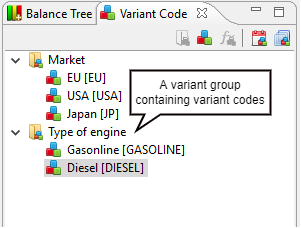
Variant expressions
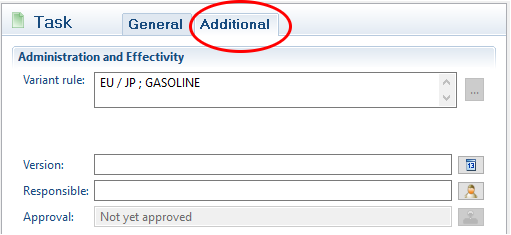
Each task in AVIX can carry a so-called variant expression. A variant expression describes the circumstances in which in a task will be valid.
The simplest form of variant expression consists of just a variant code:
E.g. EU
… which is read as: This task is to be carried out if the product is intended for a customer in the EU
Different variant codes can also be combined using operators.
E.g. EU / Japan
This task will be carried out if the product is intended for EU or Japan. If the product is intended for the USA, the task will not therefore be regarded as valid since the variant code USA belongs to the same variant group as the EU and Japan.
The available operators are:
/ OR
; AND
! NOT
In addition, sub-expressions can be grouped using parenthesis. An advanced expression may appear as follows:
E.g. (EU / Japan) ; Gasoline
This task is valid if the car is intended for the EU or Japan and has a gasoline engine. A Japanese car with a diesel engine is therefore not valid whereas one with a gasoline engine is.
From AVIX version 4.7 there is a "problems" view section where different problems can be found. E.g. a process that uses an undefined variant code