Standard Time Analysis
Once tasks have been created and part/tools added, it’s possible to create operations and go on with the standard time analysis.
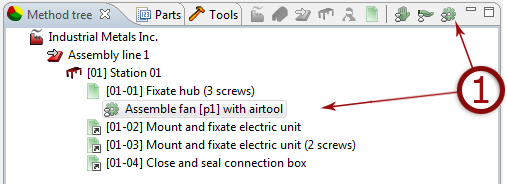
- Create operation.
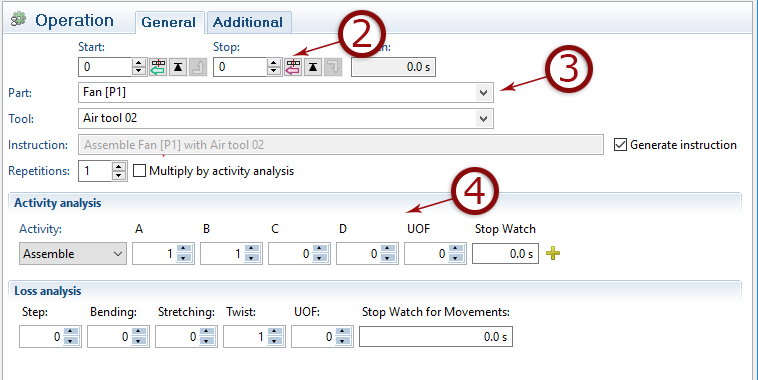
- Select start/stop positions (same methodology as for tasks).
- Select part and tools used.
- Analyse based on movements, steps etc. (explained further down).
Activity Analysis
In each operation, one or more activities are performed. There are different activities to choose from depending on the action. Select the most suitable from the drop-down list.
Note, if an activity is not selected, the time will be shown as "unclassified time" in the method result ( gray).
The activity classes A, B, C, D each contain a specific standard time based on the type of movement.
Remember to select part and tool used in the operation.
If no part is selected the the green color will not appear.
REPETITIVE OPERATIONS
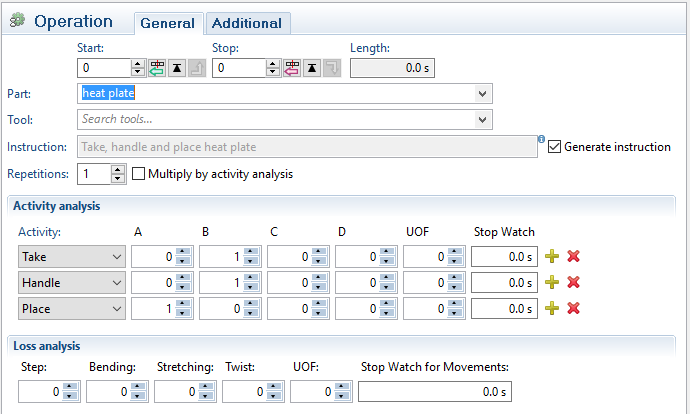
Sometimes an operation is performed repeatedly in the exact same way. By adding the number of repetitions and checking the checkbox “Multiply by activity analysis”, it is possible to shorten the analysis. Simply analyze the first operation and then add the number of repetitions.
Only the activity analysis is multiplied (A-B-C-D-UOF).
The loss analysis must be added.
Make sure not to include any operations performed only once,
e.g. Taking air tool.
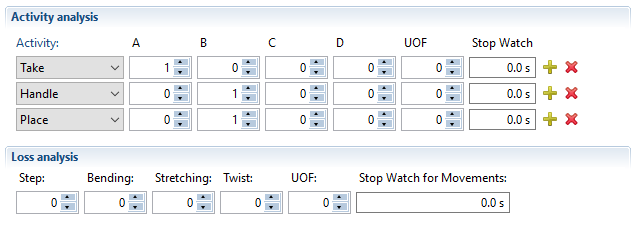
Multiple Activities
A work sequence can be analyzed using fewer operations by adding multiple activities e.g. Take, handle and place. This could be analyzed by three separate operations or with one operation containing three activities.