
Changing DFX aspects
Changing the used aspects for a DFX analysis
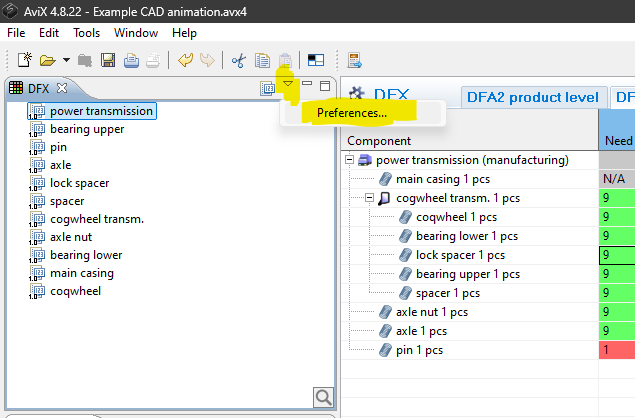
In upper corner of the DFX tab you can switch to the preferences to view the properties for the current analysis.
 '
'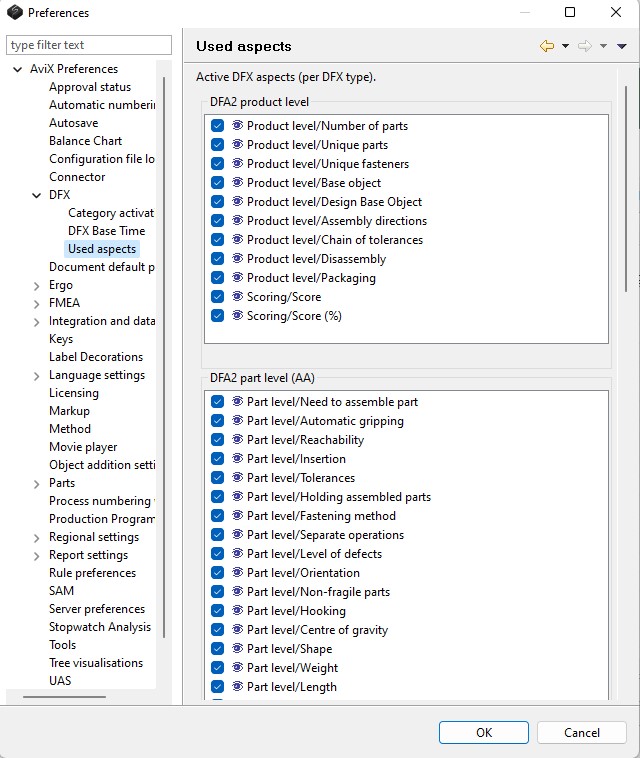
Note that the set of used aspects can be changed at any time, since removing aspects does not delete any existing data. This enables that certain aspects can be “hidden” or filtered out effectively, if the current focus during the analysis is on other aspects.
Changing the default set of aspects per DFX type
If one wants to change the default set of aspects (which is applied when an analysis is created), it can be done by opening the preference dialog in AVIX (Window --> Preferences --> AVIX Preferences --> DFX)
The aspects can also be modified in terms of scale, help text and completely new aspects can be added. This is controlled by a template file. Contact your AVIX representative for more information