Changing DFX aspects
Changing the used aspects for a DFX analysis
In the lower left corner of the DFX analysis editor, one can switch to the Properties tab to view the properties for the current analysis.
Apart from general properties (i.e. version, responsible, participants and description), the “Aspect specification” section allows the analyst to specify which aspects or aspect groups that will be used for the analysis.
Note that the set of used aspects can be changed at any time, since removing aspects does not delete any existing data. This enables that certain aspects can be “hidden” or filtered out effectively, if the current focus during the analysis is on other aspects.
Changing the default set of aspects per DFX type
Watch video: Setting the preferences
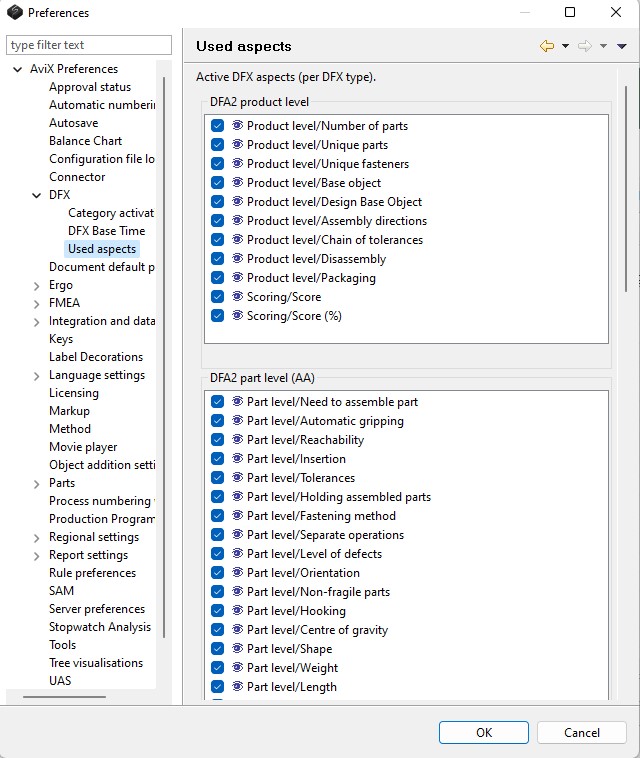
The previous sub-section described how to change the set of used aspects for an existing analysis. If one wants to change the default set of aspects (which is applied when an analysis is created), it is easily achieved. By opening the preference dialog (Window->Preferences...), the aspects that should be used for new analyses can be defined per DFX type.
In the picture below, the default setting of “Use all aspects” has been changed to “Manual assembly” for the DFX type “DFA2 part level”.