
Troubleshooting
troubleshooting AND ADDITIONAL configuration
If you need to do further configurations or are experiencing problems, please refer to the information below.
Ports and firewalls
Verify ports are open (by default TCP 2036 and 45500).
Check that firewall is open on server host for the ports:
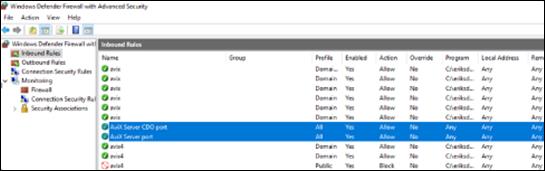
If you need to change the ports of the AVIX server, do the following:
- Stop the Windows service
- Open the "configuration/se.solme.avix.prefs" file of the AVIX server
- Under the preference section for [se.solme.avix.server.cdo], you can specify the following port (to another value than default being 2036):
- cdo.server.tcp.ports=2050
- Under the preference section for [se.solme.avix.server], you can specify the following port (to another value than default being 45500):
- http.server.tcp.port=45510
- Start the Windows service
Change memory assignment
Currently, when the server application is installed as a service, the memory allocated to the application by default is stated in the install script (commons-daemon\register_service.bat). The following lines are the instructions to the JVM, the "Java Virtual Machine", found in the install script. The relevant setting is indicated in bold font:
LogPath=%CURRENT_DIR%\logs\^
++JvmOptions=-Xms256m^
++JvmOptions=-Xmx16384m^
++JvmOptions=-XX:SoftRefLRUPolicyMSPerMB=8000^
++JvmOptions=-Dosgi.configuration.area=%CURRENT_DIR%\configuration\^
++JvmOptions=-Dosgi.install.area=%CURRENT_DIR%\
commons-daemon\prunsrv.exe //ES/SolmeAviXServer
To change the memory assignment, the ”xmx” setting can be changed in two ways. Either by re-installation of the service (make sure to edit the "register_service.bat" file, and set the desired value), or by changing a registry value for the service.
The latter is probably what you want, and it can be done by two methods. Regardless which method you choose, you should first stop the service, and when done, restart the service again.
Method 1 - Using the Registry Editor directly
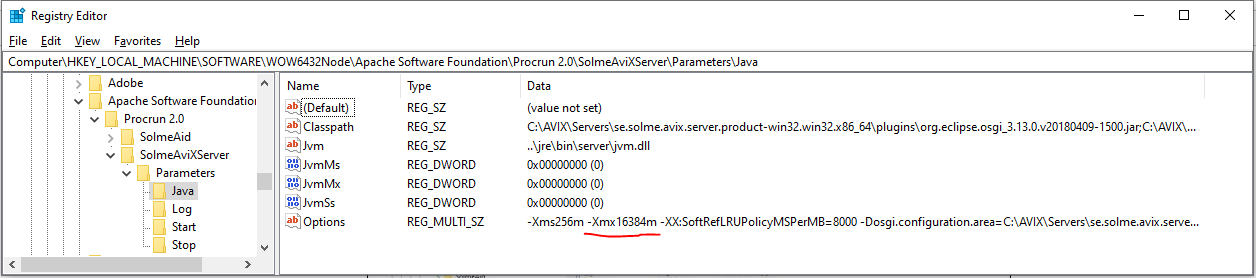
The node is found in the Windows Registry Editor under: Computer\HKEY_LOCAL_MACHINE\SOFTWARE\WOW6432Node\Apache Software Foundation\Procrun 2.0\SolmeAviXServer\Parameters\Java
Method 2 - Using the "service manager" executable
An easier way to achieve the same registry change is to run the ”service manager” executable. It is found here: commons-daemon\SolmeAviXServer.exe. Run it, and look on the Java tab:
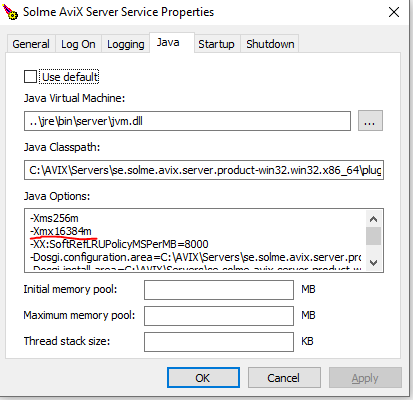
Assign the amount of xmx memory that you see fit. Example values: 16384m, 8192m, 4096m, 2048m (a judgement can be made, based on the amount of physical RAM the machine has).
Remember to restart the server service, when you have changed the xmx registry setting of the service.