
Load storages
Your AVIX server will need restarting, if you make any changes to configuration files.
InThe orderfile toload_storage.xml actuallycontrols makewhich thestorages AVIXthat are loaded by server provideduring AVIX-datastart toup. its consumers (the AVIX desktop application, the Shop Floor Viewer web application etc), it will need to connect to the actual database(s) where said AVIX-data is stored. A server repository is essentially the connection to a certain database, which in turn exists in a database management system (DBMS) on an accessible host.
If you are looking for information on how to set up a MS SQL Server database for AVIX purposes, see the document "MS SQL SERVER FOR AVIX"
REPOSITORIES.XML configuration file
By default, the AVIX server will
<?xml version="1.0" ?>
<load_storage_config>
(A)	<load_storage workspace="live" storage="db:http://127.0.0.1:45500/AVIX/live_data"/>
(B)	<load_storage workspace="workspace1" storage="Z:\Transfer\AVIX-file\After market.avx5"/>
(C)	<load_storages workspacePrefix="ws1_" storageDirectory="Z:\Transfer\AVIX-file" uploadtarget="false"/>
(D)	<load_storages workspacePrefix="ws2_" storageDirectory="${se.solme.avix.shopfloorviewer:filestorage.upload.folder}" uploadtarget="true"/>
</load_storage_config>
pick up the repositorystorage information from an XML file called "repositories.load_storage.xml", residing in the root directory of the AVIX server.
In a clean server installation, no such file exists yet.unless However,the therefile has been created and placed in the designated location. During the first start up a default load_storage.xml will be created to allow workspaces to be added from the settings page in the web application and to publish an AVIX-file from the AVIX client to the server.
There is an example file entitled "repositories. load_storage.xml.example" that can be used as a baseline to getcreate started:a file load_storage.xml to fit your purpose:
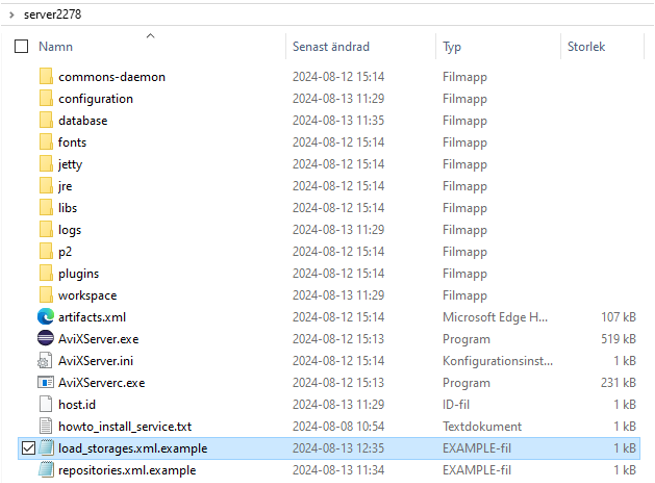
This
The example file, showcasing thefour usagetypes of bothconfigurations Postgreto SQL,load MSstorages SQLwith Serversomewhat anddifferent H2 databases.purposes.
<?xml version="1.0" encoding="UTF-8" standalone="yes" ?>
<repositoryConfigload_storage_config>
(A) <!--load_storage POSTGREworkspace="live" SQLstorage="db:http://127.0.0.1:45500/AVIX/live_data"/>
example(B) --<load_storage workspace="workspace1" storage="Z:\Transfer\AVIX-file\After market.avx5"/>
(C) <repositoryload_storages name=workspacePrefix="repo1"ws1_" type=storageDirectory="se.solme.avix.server.cdo.postgresql"Z:\Transfer\AVIX-file" serverHost="localhost"
portNumber="5432"
databaseName="avix1"
databaseUser="postgres"
databasePassword="postgres"
useSSL=uploadtarget="false"/>
(D) <!--load_storages MSworkspacePrefix="ws2_" SQL Server repository example -->
<repository name=storageDirectory="repo2" type="${se.solme.avix.server.cdo.mssql"shopfloorviewer:filestorage.upload.folder}" serverHost=uploadtarget="localhost"
portNumber="1433"
instance="SQLEXPRESS"
databaseName="avix2"
databaseUser="user"
databasePassword="pw"
useSSL="false"true"/>
<!--/load_storage_config>
A. SQLLoads Servera repositorystorage examplefrom 2the (samedatabase server,which anothergets db)the -->ID <repositorylive.
B. type="se.solme.avix.server.cdo.mssql"Loads serverHost="localhost"a portNumber="1433"storage instance="SQLEXPRESS"which databaseName="avix3"gets databaseUser="user"the databasePassword="pw"ID useSSL="false"/>workspace1 <!--created h2from repositorythe exampleAVX (self-hostedfile byAfter market.avx5.
C. Loads several storages, which gets the ID ws_+AVIX file name, one from each AVIX file in location Z:\Transfer\AVIX-file. upload target=false configures that it is not possible to upload additional storages neither from the user interface in the web client not from the AVIX server)client. -->Upload <repositorytarget=true name="admin"enables type="se.solme.avix.server.cdo.h2"uploading databaseName="admin"/>to </repositoryConfig>
ConfigureThe yourdefault databaseconfiguration repository
that Tois connectautomatically written to the load_storage.xml if no file has been manually created. It allows uploading from the web client as well as from the AVIX serverclient. to a database you intend to use for the AVIX application, make sure to create the "repositories.xml" file, and define a "repository" XML element with the appropriate values. Example of "repositories.xml", which connects to an available Postgre SQL DBMS:
<?xml version="1.0" encoding="UTF-8" standalone="yes" ?>
<repositoryConfig>
	<repository name="repo1"
                type="se.solme.avix.server.cdo.postgresql"
				serverHost="localhost"
				portNumber="5432"
				databaseName="testavix2"
				databaseUser="postgres"
				databasePassword="c863qsQt5sr3WlRPdogc1m"
				useSSL="false"/>
</repositoryConfig>
When finished, restart the server.
NOTE!
VerifyChanges database repository and connection
To testto the exampleload_storage.xml configurationonly describedhas above,effect you may launch an AVIX application and connect to your server.
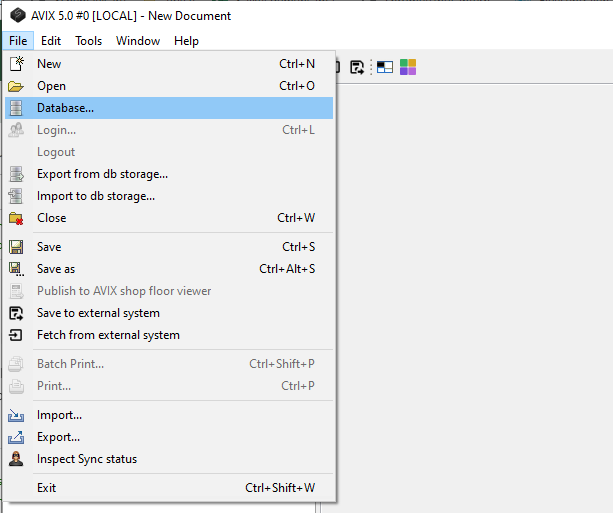
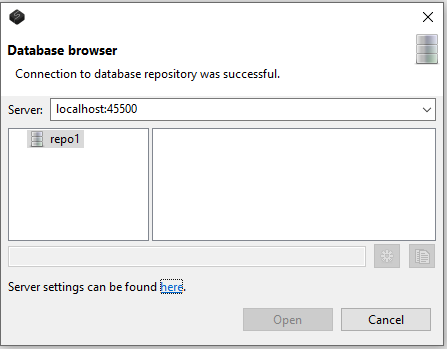
Troubleshooting
The log file "logs/AviXLogfile.log" of the server can be inspected, to see information relating to repository management. Some excerpts indicating what you can look out for .
The path to the "repositories.xml" that the server reads should be presented:
AviX CDO Server starting
Default location for CDO Server 'repositories.xml' file is in Platform.getInstallLocation(), resulting in: file:/C:/AVIX/Servers/se.solme.avix.server.product-win32.win32.x86_64/
...
CDO Server 'repositories.xml' config file is read from existing file C:\AVIX\Servers\se.solme.avix.server.product-win32.win32.x86_64\repositories.xml
Information relating to creation of defined repository:
Creating CDO repository for PostgreSQL with name: "repo1"
Server:localhost, Port:5432, DbName:testavix2, User:postgres, SSL:false
If successful connection, you should be able to see something like:
(s.s.a.s.c.p.PostgreSQLUtil:64) - SUCCESS creating repo: "repo1"In case of failure, expect something like this instead:
s.s.a.s.c.p.PostgreSQLUtil:67)    - Unsuccesful with creating the repo.
org.eclipse.net4j.db.DBException: org.postgresql.util.PSQLException: FATAL: password authentication failed for user "postgres"
	at org.eclipse.net4j.internal.db.DataSourceConnectionProvider.getConnection(DataSourceConnectionProvider.java:56)
	at org.eclipse.emf.cdo.server.internal.db.DBStore.getConnection(DBStore.java:220)
	...
Other
As stated above, the AVIX server will by default pick up the file "repositories.xml" if existing in the root directory of the server. However, if you would like to put this file elsewhere, this is possible by explicitly setting the cdo.server.repository.configuration preference in the "configuration/se.solme.avix.prefs" file of the server. Example:
#
# CDO Server settings
#
[se.solme.avix.server.cdo]
cdo.server.repository.configuration=\\SomeServer\\AVIXConfiguration\\repositories.xml
revision history
By default, the revision history support is turned off, meaning that there will be no historical information stored in the database - only the recent values of any object and its attributes will be retrievable.
If there is a need to keep historical data, revision history support can be turned on for a repository. Postgre SQL example below, but the same is available for MS SQL and H2:
<repository name="repo1" type="se.solme.avix.server.cdo.postgresql" serverHost="localhost" portNumber="5432" databaseName="avix1" databaseUser="postgres" databasePassword="postgres" useSSL="false" enableRevisions="true"/>restarted.