
Importing
AVIX CONNECTOR aims to define a common neutral format to describe all types of information. In doing so we relay on some basic building blocks.
- Object Domains
- Objects
- Parent/Child references
- Relations
Logical structure
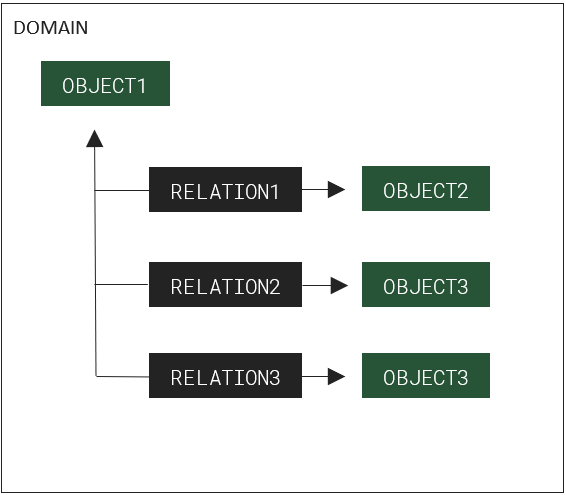
Given a generic parent child structure, in our example one parent with three children. In the import format this is modeled as in Figure 1.
PLM Objects
PLM Objects resides in an object domain (i.e. “processes”, “locations”, “products”, …), and are of a certain type (l.e. “workStation”, “line”, “part”, …). Every PLM object (or relation) has an id that is unique in the context of the import message. PLM objects also have attributes, children and relations.
Relations
PLM Objects connects with other PLM objects through relations. There are two main type of relations. Parent/child relations and domain relations between objects.
The main difference is that parent/child relations are imported in the first pass along with the other structure describing PLM objects and domain relations are imported afterwards. Relations are often used to connect PLM objects between different domains with each other. (I.e. a process to a part)
(PLM) relations are also considered PLM objects, and can hence carry the same information as PLM objects.
Update operations for lists of objects
Lists of PLM objects can be updated using three different operations.
“sync” – Modify the list in the target system so that it corresponds to the source list
“add” – Add the source PLM objects to the list in the target system
“remove” – Remove the source PLM objects from the list in the target system