
Object Life Cycle
introduction
Components
FLOW
A life cycle flow defines the complete life cycle of an object within AVIX. It is composed of a number of statuses and transitions that connect them.
configuration
Handler
Prio
Active
Any Life Cycle Flow not set as active will not be available for use by its applicable objects.
Automatic
If a Life Cycle Flow is marked as automatic and has the highest priority off all the applicable flows then any new objects created will automatically start in that flow.
Applies to
A list of AVIX object types that can use this flow. If a parent in the tree structure is selected then the flow will apply to all children of that parent.
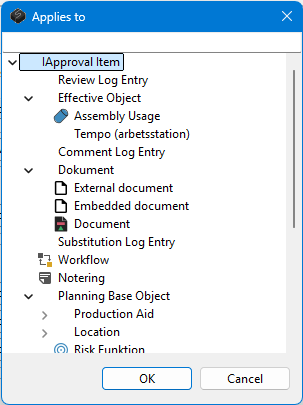
Default Status
This is the status a new execution of this flow will start in.
End Status
The statuses that can be chosen as "goals" in the Status editor page. The actual statuses that are selectable will depend on the flows accessable from the object's current status.

Default Path
The path that will be shown in the Status editor page for objects in this flow. After the object has started its flow the path can then be modified by the user to reach another goal status.

Hidden Transitions
A list of transitions that should be hidden and not shown in path. This can be useful when transitions should not be selectable by the user but still executable by for instance a trigger in another flow.
Post Triggers
This is a list of triggers that will run for every status in the flow. See the heading about triggers for more information on triggers.
Status
Transition
Configured Condition
Configured trigger
A trigger is a pre-defined action and can be created as a configured trigger for either a transition or a status. Configured Triggers attached to transitions will only execute its trigger when that transition is executed, configured triggers attached to statuses however will always execute their trigger when the object reached that status.
The configuration options of a configured trigger is tied to what trigger is selected.
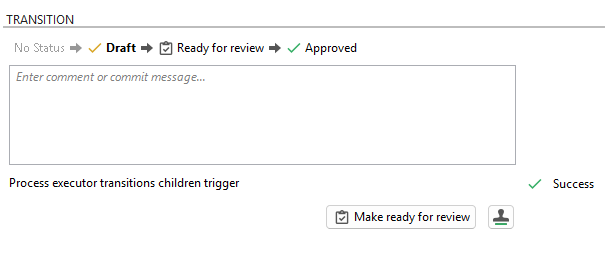
Triggers attached statuses are always executable but those attached to transitions might have prerequisites that need to be fulfilled before the transition can execute. If the triggers for a transition are executable is displayed below the text box in the Status editor page.
Trigger scripts
TBA