
Special case - Give access to a single attribute
WHEN TO USE; user should access a single cell or attribute. And when not having to create a role with a long list that excludes every other attributes.
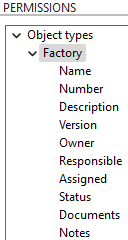
To only allow editing specific attributes in AVIX. Expand the asset and select the attribute. E.g. the Factory asset has following attributes.
If we were to create a role that only allow to edit the factory name, we would create a role that looks like this: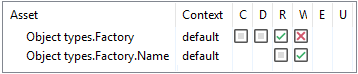
The red X will stop edit/write access on all Factory asset, but then the name asset below allow edit/write to that specific cell.