GUIDE1 - Create folder at Root Node
WHEN TO USE; user needs access to create a root level object, e.g. a folder (Parts or Process views) or factory (Method Tree view)
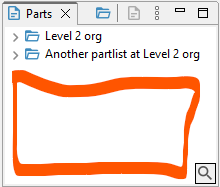 Picture 1; the red rectangle illustrates the root level of the Parts view
Example scenario: a user need access to create a Product folder at root level. I.e. not placing the folder within another folder. But the user should only be able to assign the folder to a lower level organization.
This can be designed with the following roles:
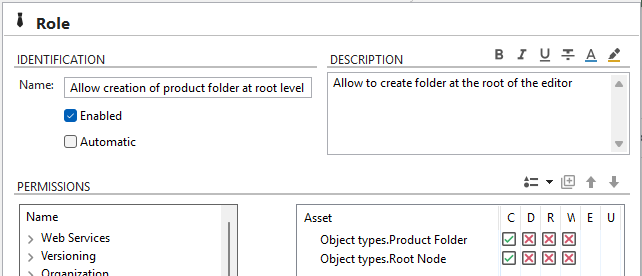
STEP 1: Design a role that allow creation of the product folder at root level. (Include the Product folder and the Root node assets.)
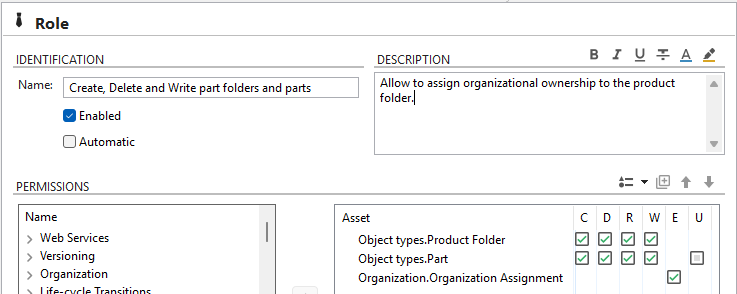
STEP 2: Design a role that allow creation and editing of folder and part. As well as assigning organizational ownership to the product folder.
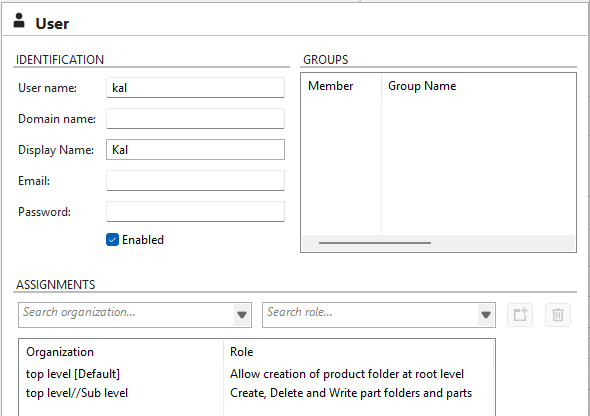
STEP 3: Assign user the role "Allow Creation of product folder at root level" to the top level organization. This enable user to create a folder at root level.
Assign user the role "Create, Delete, Write part folders and parts" to a lower level organization. This enable user to assign organization to the folder, and work with parts at a sublevel.